

Foxit Reader 2026.1.1.36485
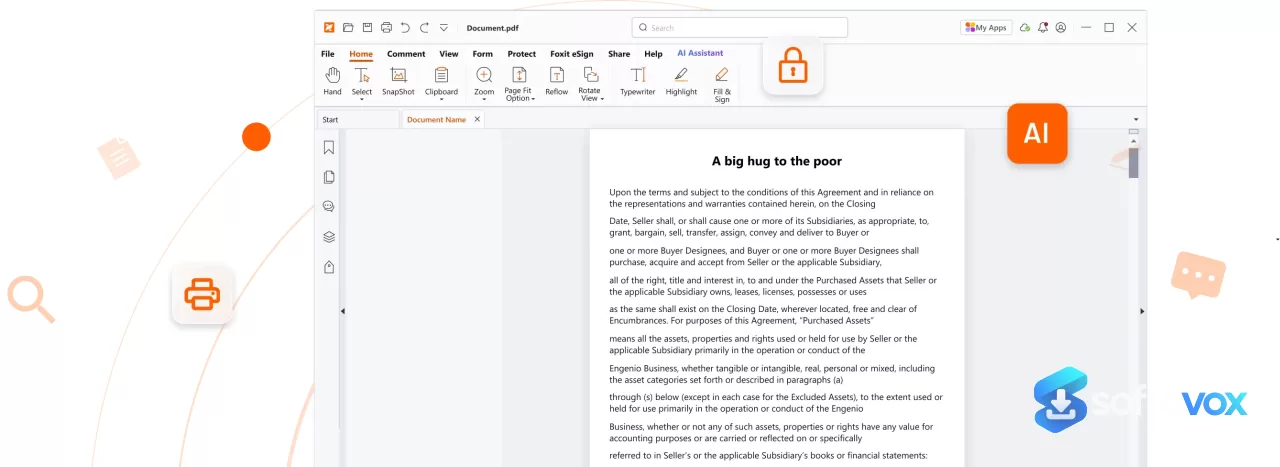
Foxit Reader is a fast, lightweight PDF reader for Windows, macOS, Linux, Android, and iOS that handles viewing, annotating, form-filling, and signing without the bulk of Adobe Acrobat. The 2026.1.1.36485 update adds the Foxit AI Assistant, Foxit Workspace for AI-powered document organization, local AI model support, and Arabic UI. The free version covers most everyday needs, but OCR and advanced editing require the paid Foxit PDF Editor ($10.99/month or $129.99/year), which is about 30% cheaper than Adobe Acrobat Pro. The interface feels cluttered, and the installer may bundle unwanted software, but for speed, security, and value, it's a solid alternative to Adobe's ecosystem.
- Free trial
- Windows
- macOS
- Nov 7, 2026
6356d70c16ee9330feaee57859b841b7e69a94c3646ba261564bfe17e084799aVirusTotal report ↗Screenshots
About Foxit Reader
Foxit PDF Reader Download, Fast PDF Viewer and Annotator
TL;DR Quick Take / Who is this for?
Foxit PDF Reader is the strongest free alternative to Adobe Acrobat Reader, and in 2026 it is a more compelling option than ever. The free version covers the essentials most people actually need: viewing, printing, annotating, form filling, and signing PDFs. It is significantly lighter and faster than Adobe’s reader, it runs on Windows, macOS, iOS, Android, and the web, and it now includes a free AI assistant with a monthly credit allowance. Capterra rates it 4.5 out of 5 from 947 verified reviews, with ease of use at 4.6 and customer service at 4.2. The trade-offs are clear. Advanced editing, OCR, redaction, and document organisation are locked behind the paid PDF Editor subscription, which starts at $14.99 per month or $119 per year. The interface feels dated compared to newer apps, and some users report occasional lag when opening files and an installer that pushes a trial of the paid Editor. Foxit PDF Reader is the right pick for anyone who wants a fast, reliable, free PDF reader that does more than just display pages. It is not the best choice for users who need full PDF editing or OCR without paying, or for anyone who wants a completely ad-free experience with no upsell prompts.
Quick Info Box
| License Type | Freeware (Reader); paid PDF Editor from $14.99/mo or $119/yr |
|---|---|
| File Size | Approx. 135 MB download / 400 MB installed (portable); 277–284 MB (desktop installer) |
| OS Compatibility | Windows 7/8/10/11, macOS, iOS, Android, Web |
| Latest Version | 2026.1.2 (Portable); 2026.2.1 (Desktop) |
| Developer | Foxit Software Incorporated |
Key Features & Real-World Usability
Foxit PDF Reader is built for speed and breadth of basic functionality. It opens PDFs noticeably faster than Adobe Acrobat Reader on most systems, and the free tier is unusually generous: you get full viewing and printing, comprehensive annotation tools, standard PDF (Acroforms) and XFA form filling, handwritten and eSignature signing, and document sharing through integrated cloud storage and enterprise CMS platforms. The security baseline is solid. Foxit includes Trust Manager, Safe Mode, ASLR and DEP support, JavaScript disabling, and security warning dialogs to protect against malicious PDFs. The 2026 releases added a free AI Assistant powered by ChatGPT integration, giving every account 300 AI credits per month for document summarisation, question answering, and contract review. A paid AI Assistant add-on at $49.99 per year expands that to 2,000 credits per month. Collaboration features include shared reviews, annotation with a large variety of tools, and file attachments as comments. The Reader also supports Group Policy, SCUP Catalog deployment, XML configuration, and a Setup Customization Tool for enterprise mass deployments. The limitations are the ones you would expect from a freemium product. Document organisation, version control, advanced security features, and redaction are only available in paid editions. OCR for turning scanned PDFs into editable text requires the paid Editor. The interface is functional but described by reviewers as basic and somewhat outdated compared to newer apps. Some users report occasional lag when opening files, and the installer prompts a trial of the paid Editor, which is easy to decline but still a minor nuisance. The free AI credits are useful but limited; heavy users will exhaust them within a week and face the paid add-on.
- Fast, lightweight PDF viewing: Opens PDFs quickly with a smaller footprint than Adobe Acrobat Reader, making it practical for everyday document reading.
- Full annotation and markup: A wide variety of annotation tools for collaborative review, including comments, highlights, and file attachments as comments.
- Form filling and signing: Supports standard Acroforms and XFA forms, with handwritten signatures and eSignature verification.
- Free AI Assistant credits: Every account gets 300 AI credits per month for summarisation, document Q&A, and contract review, with a paid add-on for heavier use.
- Cross-platform consistency: The same reading and annotation experience on Windows, macOS, iOS, Android, and the web.
- Enterprise deployment tools: Group Policy, SCUP Catalog, XML configuration, and a Setup Customization Tool for mass deployments.
- Security features: Trust Manager, Safe Mode, ASLR and DEP support, JavaScript disabling, and security warning dialogs.
- Cloud and CMS integration: Connects to leading cloud storage and enterprise CMS platforms for document sharing and collaboration.
Pros, Cons & Community/User Feedback
User sentiment around Foxit PDF Reader is broadly positive on performance and value, with consistent complaints about the freemium split and interface polish. On Capterra, the Reader holds a 4.5 average from 947 reviews, with ease of use at 4.6. Reviewers describe it as “a great lightweight PDF viewer that just works flawlessly all the time,” and one long-term user praised it as “very fast with opening and editing PDF files”. A translator highlighted that “the free version provides a multitude of features for free users, such as form filling, annotation, and teamwork,” which is a fair summary of where the value lies. Security features also draw praise: one reviewer noted that password protection and signing are “a good thing too”. The complaints fall into three categories. First, the paid/free split: reviewers note that “some advanced features are only available in the paid version,” including document organisation, version control, redaction, and OCR, and that “the interface feels basic compared to newer apps”. Second, installer behaviour: one systems administrator described the installer wanting to install a trial of the Editor as “easy enough to disable, but still a bit of a nuisance,” which is a recurring theme. Third, reliability edge cases: some users report an update that “refuses to install” and occasional lag when opening PDFs. Independent analysis adds context. Foxit is positioned as a lower-cost Acrobat alternative, and that positioning is accurate for the paid Editor tier, but the free Reader is deliberately scoped to reading, annotating, and signing. The practical takeaway is that Foxit PDF Reader delivers excellent value for the price of nothing, but users who need editing, OCR, or redaction will eventually have to pay, and the upsell prompts make that boundary visible.
Pros
- Fast and lightweight compared with Adobe Acrobat Reader
- Generous free tier: viewing, printing, annotation, form filling, and signing at no cost
- Free AI Assistant with 300 credits per month for summarisation and document Q&A
- Cross-platform support on Windows, macOS, iOS, Android, and web
- Strong security features including Safe Mode, ASLR/DEP, and JavaScript disabling
- Enterprise deployment tools for mass rollouts via Group Policy and SCUP
- Cloud and CMS integrations for collaborative workflows
- 4.5 average rating from 947 Capterra reviews, with ease of use at 4.6
Cons
- Advanced editing, OCR, redaction, and document organisation require the paid Editor
- Interface feels dated and basic compared to newer PDF apps
- Installer prompts a trial of the paid Editor, which must be manually declined
- Some users report occasional lag when opening PDFs
- Update installation issues have been reported by multiple users
- Free AI credits are limited to 300 per month; heavy users need the paid add-on
- Document version control and advanced security features are paid-only
Final Verdict & Safe Download Advice
Foxit PDF Reader is the best free PDF reader for most Windows users in 2026, and it is a genuinely viable replacement for Adobe Acrobat Reader. The free version covers reading, annotating, form filling, and signing, the performance is faster than Adobe’s, and the addition of free AI credits makes it more capable than most competitors at the same price. The paid Editor tier at $14.99 per month or $119 per year is competitively priced against Acrobat, and it unlocks the editing, OCR, and redaction features that the free Reader deliberately omits. The caveats are manageable. The interface is not modern, the installer nudges you toward the paid Editor, and some users encounter update or performance hiccups. If you only need to read and annotate PDFs, the free Reader is all you need, and you can decline the Editor trial during installation. If you need to edit text and images in PDFs, OCR scanned documents, or redact sensitive content, the paid Editor is the right upgrade. For everyone else, Foxit PDF Reader is the sensible default.
- Download only from foxit.com or official app stores: The official site distributes the desktop installer, and the mobile apps come from Google Play and the Apple App Store. Third-party “Foxit Reader” download sites may repackage the installer with unwanted software or outdated builds.
- Verify the installer size and version: The desktop installer is approximately 277–284 MB, and the portable version is 135 MB download / 400 MB installed. The current versions are 2026.1.2 (portable) and 2026.2.1 (desktop). A dramatically smaller file or an older version number is a warning sign.
- Check system requirements before installing: Foxit PDF Reader supports Windows 7, 8, 10, and 11 (32-bit and 64-bit), macOS, iOS, and Android. The portable version requires WebView2 on Windows 7, which must be installed manually.
- Decline the Editor trial during installation: The installer offers a free trial of the paid Foxit PDF Editor. If you only want the free Reader, deselect this option during setup. It is not required for the Reader to function.
- Review the AI credit allowance before relying on it: The free AI Assistant gives 300 credits per month, which is enough for occasional use but not for daily document analysis. If you need more, the paid add-on is $49.99 per year for 2,000 credits per month.
Similar software


Key features
- AI Assistant & Workspace, Foxit AI Assistant with a smart Workspace that organizes projects around documents or topics, extracts and summarizes content, and generates reusable assets like mind maps, presentations, and infographics
- Enhanced AI Chat, Redesigned from a simple Q&A interface into a context-aware Agent that can execute tasks in cycles, invoke tools, and manage skills
- Local AI Support (BYOM), Bring Your Own Model and Small Language Models (SLMs) allow you to keep data on your own device and use custom AI models
- Document Summary & Rewrite, AI-powered summarization and rewriting tools that generate concise summaries and paraphrase text while maintaining original meaning
- Document Translation, Full-document translation to 27+ languages while preserving tables, charts, and layout, with no page cap
- Smart PDF Commands, Type natural language commands like "Redact every account number" or "Add page numbers and a watermark" and the editor executes them
- AI Bookmark, Automatically creates bookmarks based on document structure or page ranges
- Spelling & Grammar Correction, Automatically detects and corrects spelling and grammar errors in your content
- Safe Reading Mode, Limits what suspicious PDFs can trigger on your machine, blocking unauthorized actions and data transmissions
- Action Inspector, Analyzes JavaScript actions in documents when opened and warns users in real-time if potential risks are detected
- Annotation & Markup Tools, Highlights, comments, sticky notes, drawing tools, and text markup for collaborative review
- Form Filling & E-Signatures, Fill out PDF forms, save unfinished forms, and apply digital signatures with verification
- Fast & Lightweight, Installs quickly, opens PDFs instantly, and doesn't hog system resources
- Cross-Platform Support, Available on Windows, macOS, Linux, Android, iOS, and as a portable app
- Cloud Collaboration, Real-time co-authoring, cloud storage integration, and document sharing
- Chats Tab, New tab on the Start page for managing AI chat history across different documents
- OCR (Paid), Optical Character Recognition for scanned documents is available in the paid PDF Editor, not the free Reader
- Pricing, Free Reader for viewing/annotating; PDF Editor starts at $10.99/month** or **$129.99/year
Frequently asked questions about Foxit Reader
Is Foxit Reader safe to use?
Is Foxit Reader free?
What systems does Foxit Reader run on?
What is Foxit Reader used for?
Why did bundled software get installed when I set up Foxit Reader?
How is Foxit Reader different from Adobe Acrobat Reader?
What’s new in Foxit Reader 2026.1.1.36485
New Features & Improvements
The key highlight of this release is the upgrade of the real-time PDF collaboration service:
Foxit DMS Integration: The real-time collaboration service is now powered by the Foxit Document Management System (DMS) in certain regions. This change is designed to provide a more efficient workflow and a smoother, more seamless user experience.
🔒 Security Vulnerabilities Fixed
Although the official release notes simply state that "some security and stability issues" were addressed, independent security research has revealed several critical vulnerabilities patched in this version:
CVE-2026-5937 (Medium Severity): A vulnerability in automatic directory imports. Insufficient parameter verification leads to format errors in files, triggering an unhandled std::invalid_argument exception that causes the program to terminate, resulting in a denial-of-service (DoS) condition. This flaw was patched in version 2026.1.1.36485.
CVE-2026-57256 (High Severity - CVSS 7.8): A use-after-free vulnerability in Foxit Reader's JavaScript checkbox (CBF_Widget) functionality. A specially crafted malicious file can lead to remote code execution (RCE). This flaw affects version 2026.1.1.36485 and was fixed in a later update.
Multiple Additional Vulnerabilities: According to management platform records, this release also addressed several other vulnerabilities, including CVE-2026-5938, CVE-2026-5939, CVE-2026-5940, CVE-2026-5941, CVE-2026-5942, and CVE-2026-5943. These were classified as "Important" severity.
📌 Important Notes
Update Recommendation: Because this version patched the critical security vulnerabilities listed above, updating to 2026.1.1.36485 or a newer version (such as 2026.2.1.39815) is strongly recommended.
Official Resources: For more details and official security bulletins, you can visit the following Foxit pages:
Version History: https://www.foxit.com/pdf-reader/version-history.html
Security Bulletins: https://www.foxit.com/support/security-bulletins.html
Versions
| Version | Release date | Platform | File size | |
|---|---|---|---|---|
| Foxit Reader 2026.1.1.36485 Latest version | Apr 27, 2026 | Windows | 453.9 MB | Download |
Comments about Foxit Reader
No comments yet. Share your experience with this program!